Large videos, software packages, design assets, database exports, and project folders can be shared through peer-to-peer tools or cloud-based services. Both methods move data between devices, but they solve different problems.
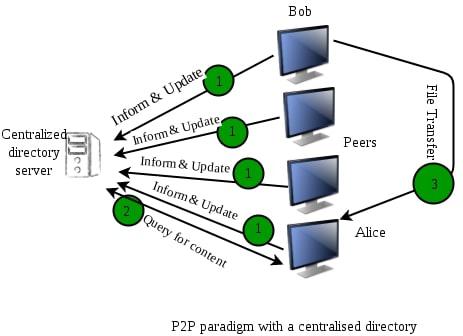
Cloud platforms keep files on infrastructure managed by a service provider and make them available through accounts, applications, or shared links. Peer-to-peer systems allow participating devices to exchange data directly, although some tools still rely on discovery servers, trackers, relays, or cloud control services to establish connections.
The correct choice depends on availability, collaboration needs, network topology, security requirements, transfer volume, and the ability to maintain source devices. File size alone is not enough to determine the better option.
Quick Overview: Should You Choose P2P Sharing or Cloud Storage?
Use Case & ContextOptimal ChoiceCore ReasonTeam collaboration and simultaneous document editingCloud StorageServices such as OneDrive and SharePoint support sharing permissions, version history, and real-time co-authoring for compatible filesDistributing a large static file to many recipientsP2P or HybridRecipients may exchange already received pieces, reducing repeated downloads from the original sourceAccessing data from different devices at any timeCloud StorageFiles remain available while the provider and account are operationalSynchronizing several controlled devices on the same LANP2P SynchronizationDirect local connections may avoid sending the same data through an external cloud serviceSending files to non-technical clientsCloud StorageA normal browser link is usually easier than installing and configuring a P2P clientReducing repeated downloads across an office networkHybrid P2P DeliveryLocal devices or caches can redistribute previously downloaded contentMaintaining a recoverable copy of critical dataDedicated Backup SystemNeither ordinary synchronization nor file sharing should automatically be treated as a complete backupMicrosoft’s co-authoring documentation confirms that compatible Word, PowerPoint, and Excel files stored in OneDrive or SharePoint can be edited by multiple authorized users. P2P synchronization tools generally do not provide the same application-level editing model.
Understanding the Basics: What Are P2P Sharing and Cloud Storage?
What Is Peer-to-Peer (P2P) File Sharing?
P2P describes a system in which participating devices can exchange data with one another rather than obtaining every copy from one permanent central download source. The exact behavior depends on the product. BitTorrent divides content into verifiable pieces. After a peer receives and validates a piece, it can announce that the piece is available to other peers. Connections are symmetrical, so data can move in both directions.
Syncthing is a continuous file-synchronization application that copies changes among approved devices. Resilio Sync also uses peer-to-peer connections to synchronize data stored on users’ equipment. These tools are not interchangeable with a public BitTorrent swarm, even though all use peer communication. P2P does not always mean that no supporting server exists. Syncthing may use global discovery and community relay servers when direct connections are unavailable. Resilio can also use a relay while keeping transferred data encrypted between participating peers.
What Is Cloud-Based File Sharing (Cloud Storage)?
Cloud storage keeps data on infrastructure operated by a provider such as Google, Microsoft, Dropbox, or Amazon Web Services. The architecture should not be described as one physical central server. Major cloud providers distribute data and services across many storage systems, data centers, availability zones, and network locations. The service still presents a centrally administered account, permission model, and copy of record to the customer.
Recipients usually access a file through a website, synchronized folder, application, or download link. Google Drive, for example, allows an owner to grant viewing, commenting, or editing access.
Core Architectural Differences
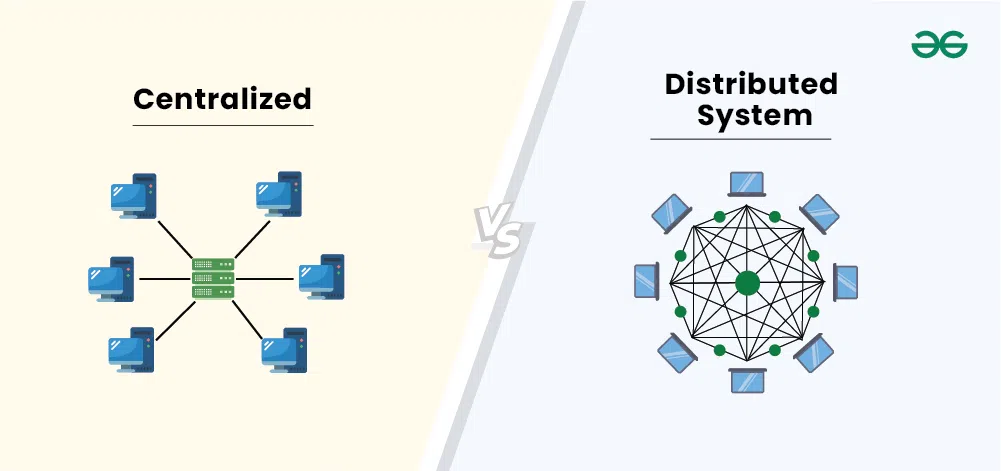
The difference is not simply “one server versus no server.”
Cloud Model: The provider stores and serves the authoritative cloud copy through managed infrastructure. Users depend on the provider’s authentication, availability, pricing, permission system, and service policies.
P2P Model: One or more participating devices hold the data and exchange it with authorized peers. Availability depends on those devices, their network connections, and the configuration of the P2P application.
A P2P deployment can still include a continuously online server, relay, tracker, or discovery service. A cloud service can also use local caching and peer-assisted delivery. Modern architectures frequently combine both approaches.
In-Depth Comparison: P2P Distribution vs. Cloud Storage
1. Data Transfer Speed (LAN vs. Internet)
Cloud Storage: Transfer speed depends on the user’s connection, provider capacity, geographic routing, application limits, and any account or service restrictions. Uploading one file to the provider and sharing it can be efficient because the original device does not need to remain online.
When many users download the same cloud object, the provider supplies each copy. Enterprise object storage may include storage, request, retrieval, transfer, and acceleration charges rather than one simple subscription fee. AWS lists these as separate components of Amazon S3 pricing.
P2P Distribution: Several peers may supply different pieces at the same time. This can reduce pressure on the original uploader when enough fast, reachable peers hold useful data.
More peers do not guarantee greater speed. Slow upload connections, firewalls, relays, overloaded disks, missing pieces, protocol overhead, and poor peer selection can limit performance.
Over LAN: Direct local synchronization can be fast because traffic does not need to travel through a remote storage region. Resilio recommends direct connections and notes that devices on the same physical LAN should normally be able to establish them. Syncthing local discovery similarly allows devices to locate one another within a local network, subject to router and subnet configuration.
Actual speed is limited by the slowest relevant component, including Wi-Fi quality, Ethernet capacity, disk performance, encryption overhead, and device processing.
2. Data Security and Privacy
IP Address Privacy: Participants in a public BitTorrent swarm can generally learn network addresses needed to connect to other peers. Private synchronization tools limit participation to approved devices, but discovery or relay operators may still observe connection metadata.
In ordinary cloud sharing, recipients generally do not need each other’s IP addresses. The cloud provider, network operators, and security systems can still process connection and account metadata.
Encryption and Control: P2P is not automatically private. Security depends on the application, key management, device configuration, and the people granted access. Syncthing documents metadata exposure associated with discovery, while Resilio states that its transferred data is encrypted.
Cloud services commonly encrypt data in transit and at rest, but key-control models vary. Some systems use provider-managed keys, while enterprise platforms may support customer-managed encryption options.
Whichever model is selected, sensitive files may need client-side encryption, access logging, device protection, retention policies, and a tested revocation process.
3. Storage Limits and Cost Model
Evaluation MetricP2P DistributionCloud StorageStorage Capacity CostUses storage owned or managed by participantsUses provider capacity under a free allowance, subscription, or usage-based planBandwidth CostNo separate provider egress fee in many personal setups, but internet service, power, hardware, and administration still cost moneyConsumer plans may include transfer in the subscription; enterprise services may charge for requests, retrieval, or outbound trafficFile Size LimitsDetermined by the application, filesystem, device, and protocolDetermined by the selected provider and productHardware ResponsibilityUsers maintain the storage devices and source availabilityProvider maintains the storage infrastructureScalabilityRequires enough devices, storage, and upload capacityCapacity can often be expanded by changing the service planP2P should not be described as free. Local disks fail, source devices consume electricity, internet connections have upload limits, and someone must maintain the system.
Cloud limits also vary widely. Google Drive, for example, allows stored videos up to 5 TB when the account has enough available storage, while shared-drive users are subject to daily upload and copy limits. A fixed range such as “100 GB to 5 TB per file” cannot represent every provider.
4. Accessibility and Internet Dependency
Cloud files usually remain available after the original uploader turns off their computer. Availability still depends on the account, provider, permissions, service status, and network access.
P2P requires at least one reachable device containing the requested data. In a BitTorrent swarm, a transfer can stop when no reachable participant possesses all missing pieces.
A synchronization system behaves somewhat differently. Once Syncthing has copied a complete file to several devices, each device has its own local replica. Those copies remain usable offline, but new changes cannot synchronize until the relevant devices can communicate again.
Local-network transfer without internet access may be possible when peers already know how to reach one another. Some systems still require cloud discovery or control services for particular features, so offline behavior should be tested before it is relied upon.
5. Version Control and Team Collaboration
Cloud Storage: Services may provide comments, sharing roles, version history, recovery, browser editing, and co-authoring. Google Drive lets owners grant view, comment, or edit permission, while Microsoft supports co-authoring and restoration of earlier versions for compatible documents.
P2P Distribution: Synchronization products are useful for maintaining copies but do not automatically merge simultaneous edits. Syncthing creates a separate conflict file when different devices modify the same file concurrently.
Some P2P tools include file versioning, selective synchronization, or conflict handling. These features are valuable but are not equivalent to several people editing one Office or browser document together.
Cloud synchronization must not automatically be treated as backup. A deletion, encryption event, or unwanted edit can propagate to synchronized devices. Dropbox itself distinguishes synchronization from backup and recommends using both for different purposes.
When SHOULD Businesses and Individuals Choose Cloud Storage?
Cloud storage is usually more suitable when:
Daily Office Collaboration Is Required: Staff need shared permissions, comments, version history, and simultaneous editing.
Continuous Remote Access Is Needed: Files must remain available without depending on an employee’s computer or office NAS.
External Clients Need Simple Access: Recipients should be able to open a controlled browser link without installing specialist software.
Central Administration Is Required: Administrators need account provisioning, audit records, retention controls, access revocation, and organization-wide policies.
A Managed Backup Feature Is Available: The service provides separate backup, retention, and restoration capabilities that have been tested. Uploading or synchronizing a folder alone is not a complete disaster-recovery plan.
The Hybrid Model: Leveraging the Strengths of Both P2P and Cloud
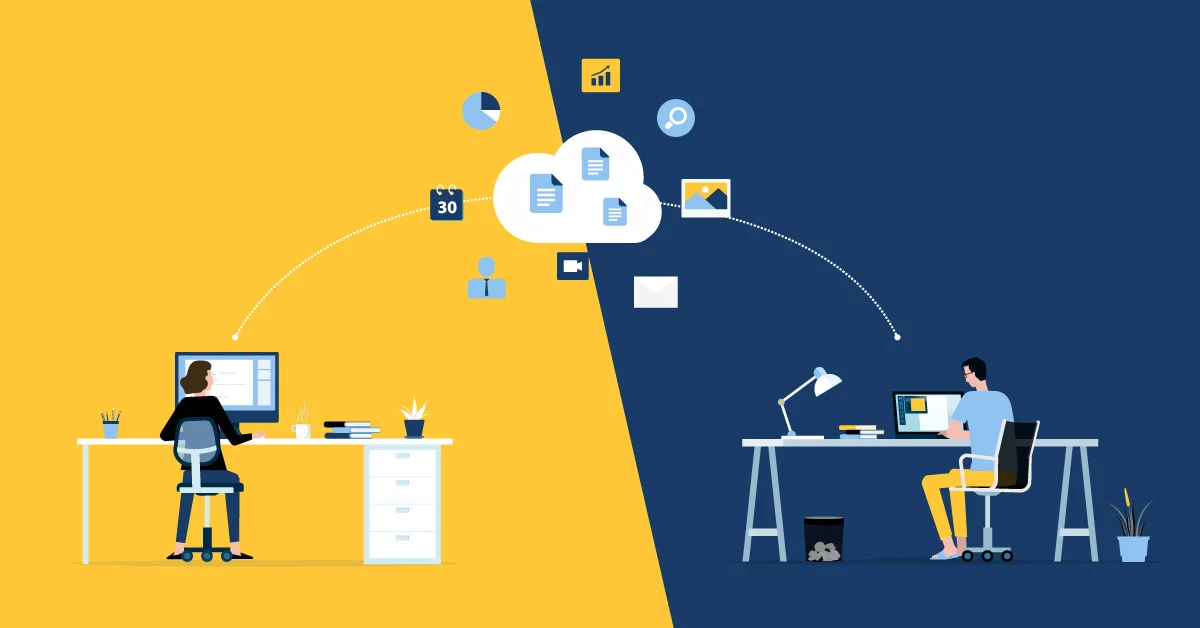
A hybrid design can keep the authoritative copy in managed storage while using local peers or caches to reduce repeated internet transfers.
Cloud as the Primary Repository: Master files remain available through controlled accounts, access policies, retention, and recovery processes.
P2P as the Distribution Engine: Branch devices exchange previously downloaded packages or use a local cache when many machines need the same content.
Microsoft Delivery Optimization is one example. It can retrieve supported Windows content from internet sources, local peers, or a connected cache. Microsoft reports that more than 76% of content in one internal deployment came from peer devices, but this result belongs to that deployment and should not be treated as a universal saving.
A hybrid system still needs monitoring. Administrators must control which devices can act as peers, how long content is cached, what bandwidth can be used, and which data is permitted to leave a managed repository.
Step-by-Step Decision Framework to Choose the Right File Sharing Tool
Step 1: Define the Type of Work
If several people must edit the same live document, select a collaboration-focused cloud service.
If the file is a completed package that will not be edited, continue evaluating P2P or hybrid distribution.
Step 2: Count Independent Recipients
A cloud link is often simplest for a small or changing group.
P2P becomes more useful when many approved recipients need the same large, static data and can contribute upload capacity.
Step 3: Review Network Topology
Devices on one controlled LAN may benefit from direct synchronization or a local cache.
Remote users behind restrictive firewalls may depend on relays, cloud storage, or a professionally managed delivery service.
Step 4: Confirm Availability Requirements
Use cloud or a continuously available managed server when recipients must access files at any time.
Use P2P only when enough source devices can remain online or each recipient already maintains a complete synchronized copy.
Step 5: Review Security and Compliance
Determine where data may be stored, who manages encryption keys, whether peer IPs or metadata are exposed, and how access can be revoked.
Highly regulated or confidential data may require a managed system with documented auditing, retention, and legal controls.
Step 6: Build a Separate Recovery Plan
Keep versioned backups isolated from ordinary synchronization. Test restoration rather than assuming that several synchronized copies are sufficient.
P2P distribution and cloud file sharing are not opposing solutions with one universal winner.
Choose Cloud Storage when the priority is continuous access, simple external sharing, centralized permissions, browser-based collaboration, and managed administration.
Choose P2P Distribution when approved devices need to exchange large static files directly, take advantage of local-network capacity, or reduce repeated downloads from one source.
Use a Hybrid Model when a managed cloud or server copy must remain authoritative but many devices can share cached data locally.
The final choice should be based on workflow, recipient count, availability, network conditions, security, recovery, and total operating cost not an arbitrary file-size threshold.